Graph trial1.7.2
Publisher Description
Please use the Graph Pro that specialize in Android4.0 or later those who use the Android4.0 or later.
Graph Pro
https://play.google.com/store/apps/details?id=jp.co.sinwa.graph.pro.core
You can make a graph easily.
It's useful for recording time of some sports, sales record, weight management, etc.
example
Utility costs, Fuel consumption, Food costs, Base body temperature,Blood glucose level,
Jogging distance, Overtime hours, Blood pressure, Body fat percentage, Golf score
Trial version is free.
In the trial version of data that can be registered is limited to 7.
This is full version.
https://play.google.com/store/apps/details?id=jp.co.sinwa.graph.core
You can export data to full version Graph by Settings->All data export and All data import.
function
-Line chart
-Bar chart
-Pie chart
-Summary
-Draw base line
-Input by day / count
-Memo
-Svae image
-Share image
-CSV export, import
-Select icon
-All data export, import
-Support IceCreamSandwich
-News search graph
-Icon order change
-It is possible to input more than once a day in date chart
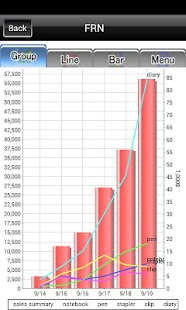
-Group graph
-Bar chart has been modified to appear in the order from the most recent data.
-Font size settings
-Widget
-Design renewal
-Simple graph
-Widget transparent
-Plot data label
-Display Summary Average Max Min
-Summary based first date
About Graph trial
The company that develops Graph trial is Sinwa Electric Corp.. The latest version released by its developer is 1.7.2. This app was rated by 1 users of our site and has an average rating of 5.0.
To install Graph trial on your Android device, just click the green Continue To App button above to start the installation process. The app is listed on our website since 2014-05-18 and was downloaded 13 times. We have already checked if the download link is safe, however for your own protection we recommend that you scan the downloaded app with your antivirus. Your antivirus may detect the Graph trial as malware as malware if the download link to jp.co.sinwa.graph.trial is broken.
How to install Graph trial on your Android device:
- Click on the Continue To App button on our website. This will redirect you to Google Play.
- Once the Graph trial is shown in the Google Play listing of your Android device, you can start its download and installation. Tap on the Install button located below the search bar and to the right of the app icon.
- A pop-up window with the permissions required by Graph trial will be shown. Click on Accept to continue the process.
- Graph trial will be downloaded onto your device, displaying a progress. Once the download completes, the installation will start and you'll get a notification after the installation is finished.
Program Details
System requirements
Download information
Pricing
Version History
version 1.7.2
posted on 2014-05-18
version 1.5.0
posted on 2013-02-07
Several fixes and updates
